
Ask your mail a question. It answers with a count, a list, or a written answer that cites the messages it used.
It reads the classic Outlook profile already open on your PC. Ask answers from the local index; a written answer comes only from a model you configured and the messages it can cite. The store, the classifier and the learned profile stay on your disk.
InstallRead the first-run guide
Windows installer. No account, no telemetry.
 Mailsense
Preview
Ask first
Ask answers a question about your mail in plain language. The screen names which mechanism answered it: a typed query, a search, or a model you configured.
A written answer cites every message it uses.
The model is asked to write at most 120 words and marks each claim with a message number. The server checks every marker against the retrieved set, refuses an answer whose marker points outside it, renumbers the markers to citation positions and keeps a citation only when it names a real message. When no citation survives, the matching messages stay on screen with a notice that names the cause.
- Signed proposal for the Northwind launch Atelier Nord
- Thursday pickup window Harbor Logistics
- Invoice 1042 needs a second look Studio Lumen
A count or a ranking is computed, not written.
A count, a ranking and a company profile are read from the local index and the stored facts. The number and the rows come from a typed query, never from model text. Local mode never calls a model: the same count still answers, and a free-form question returns the matching messages with a notice that says Local never calls a model.
A citation opens the message, and the answer is kept.
Each citation row carries the subject, the sender and the date, and links to the message it names. Each answer is stored with its question, its route, its mode, its citations and, when a model was used, its provider and model. The history rail reopens it, and Clear history removes every stored answer.
Three modes, one rule
| Mode | What answers | When a model runs |
|---|---|---|
| Auto | The local index and ranking when the question has an exact answer, otherwise the provider you configured or the matching messages. | Only for a question no exact intent covers. |
| Local | The local index, the ranking and the stored profile. | Never. |
| Remote | The provider you configured, grounded in the retrieved messages. | For every question with retrieved evidence. Offered only when a provider is usable. |
Every citation opens the message it names, and every answer is stored with its question so you can reopen it.
Ask is bounded by qa.max_messages, qa.retrieval_timeout, qa.call_timeout and the two budget settings. A warming index keeps the question and offers Try again.
Three things it does differently
The queue, the evidence and the gate. Each one is a mechanism you can inspect.
An invented queue. The score is local policy, not a model call.
| Rank | Subject | Sender | Action |
|---|---|---|---|
| 01 | Signed proposal for the Northwind launch | Atelier Nord | Decide |
| 02 | Invoice 1042 needs a second look | Studio Lumen | Verify |
| 03 | Thursday pickup window | Harbor Logistics | Reply |
| 04 | Workshop notes and the two open questions | Morgan Ellis | Read |
Queue
The queue is scored by a fixed local policy.
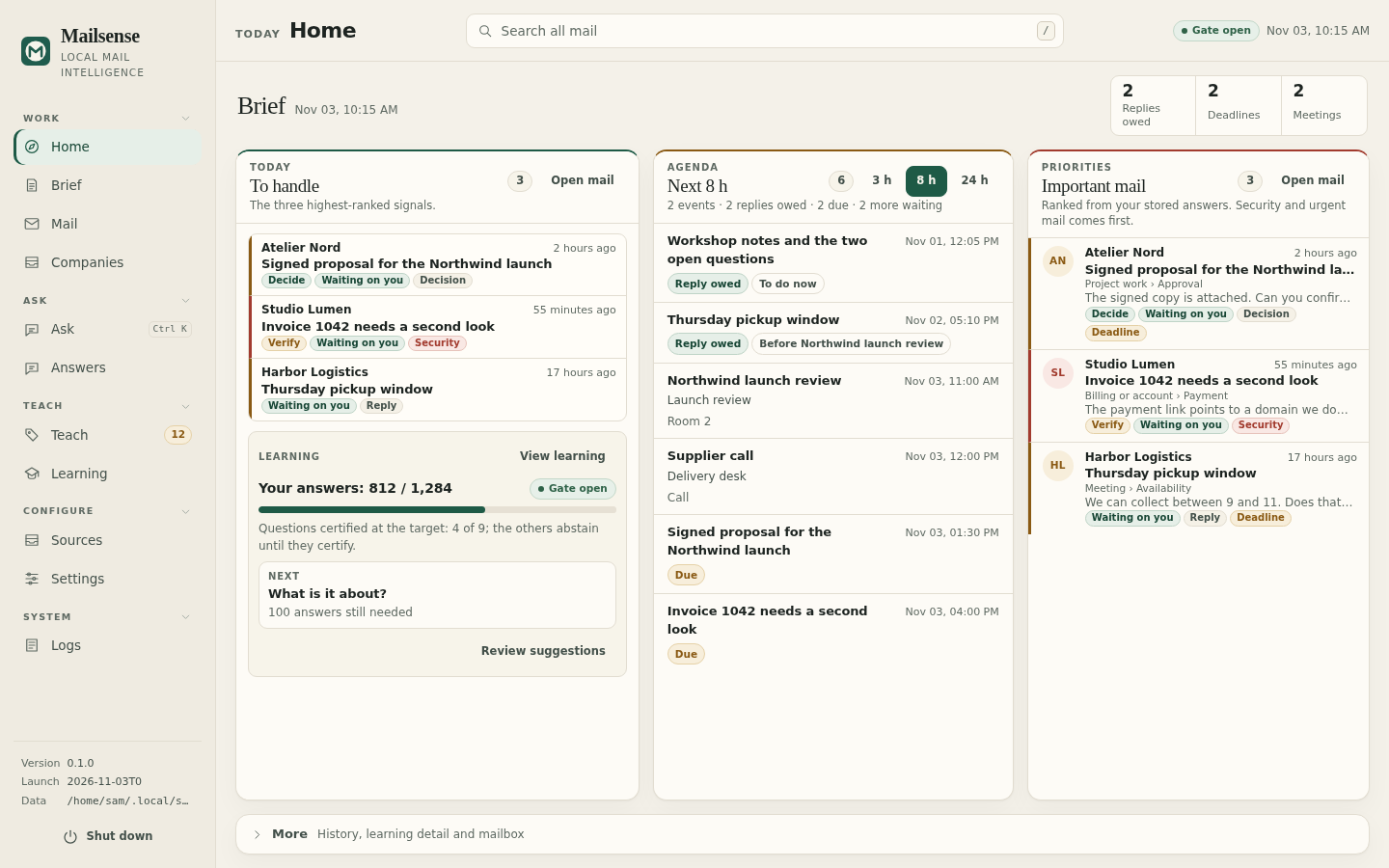
A local Go scorer ranks each message from stored signals: a suspicious message adds 100, a decision 45, a reply 30, urgency and deadline levels add fixed weights, and recency adds at most 12. A score of 20 is the floor, and a suspicious, decision, reply, urgent or deadline signal always enters. Bulk automated mail never enters, however urgent its text.
Evidence
Every label names its source.
A decision is stored as answers to named questions, with the confidence each answer carries where the question type has one and the evidence behind it. The message detail shows the fields the model read. When an index is partial, the screen names the missing part.
Learning
It abstains until your own labels certify it.
The local classifier trains one head per question on your corrections. A question is certified only when the Wilson lower bound of its answered precision reaches 0.99 on a held-out split, with at least 200 training labels, 50 evaluation labels and 0.5 coverage. Below that threshold it abstains, and the Learning screen names the stage that blocks it.
The screens, starting with Ask
Captured from the Linux preview with an invented mailbox. No real mail appears here.
What leaves the machine
Mailsense makes five kinds of network request. Each one has a reason you can see.
Leaves, only when it runs
- The pinned local runtime and embedding model, downloaded once and checked against SHA-256 before use.
- A request to a remote provider you configured, for an Ask answer or automatic triage after a sync. It carries the question and the message fields that call needs.
- A provider model list when you press Fetch models.
- One small test request when you press Test. A test is billable and is not covered by a budget.
- The update check: at most once per update.check.interval (24 hours by default), one request to GitHub asks for the latest published release. It carries no mail, address or installation identifier, and can be turned off in Settings.
Never leaves
- The mail store, attachments, indexes and learned profile. They are SQLite files in the data directory you chose.
- The classification, evidence and ranking code. They run as local Go code, not as a cloud call.
- No telemetry, no analytics and no vendor account.
Mailsense reads the classic Outlook profile already open on Windows. It does not ask for Microsoft credentials. A remote provider's terms govern what it does with a request you send. See privacy.
What it cannot do yet
These limits are part of the current build.
-
Only classic Outlook on Windows is a live source.
It reads the profile through COM. New Outlook, Outlook on the web, IMAP, POP, the Gmail API, Microsoft Graph and file import are not connected in this build.
-
The Linux preview is built from source.
It opens, renders every screen and explains the missing source. The inbox stays empty because there is no live connector yet.
-
It reads and ranks. It does not act on the mailbox.
No sending, deleting, moving or read-state changes. The connector is read-only.
-
Triage needs a decider.
Without one, triage answers 422 provider_not_configured. Search and the local classifier still work.
-
The database is not encrypted by the app.
Your operating-system account and disk encryption are the protection. Provider keys on Windows use DPAPI.
-
There is no SQL console and no diagnostics bundle.
Logs are local and readable in the Logs screen. They redact secrets.
Install
The release ships a Windows installer; the source also builds on Linux as a preview with an empty inbox, and that build is not a release download.
Windows installer
mailsense-<version>-setup.exeThe version comes from the release tag. Download the file from the releases page.
- Installs per user.
- Needs no administrator rights.
- Keeps the data directory when you uninstall.
Mailsense needs the WebView2 runtime, which Windows 11 and current Windows 10 already have. The build is not code-signed, so SmartScreen may ask you to confirm the publisher.
The first run writes the setup marker, lists the Outlook stores and shows the resource ceilings. Nothing is read from mail before you pick a store.
Status
Mailsense is in active development. Interfaces and stored schemas may change between releases; the changelog and the release notes call out anything that requires a migration.